

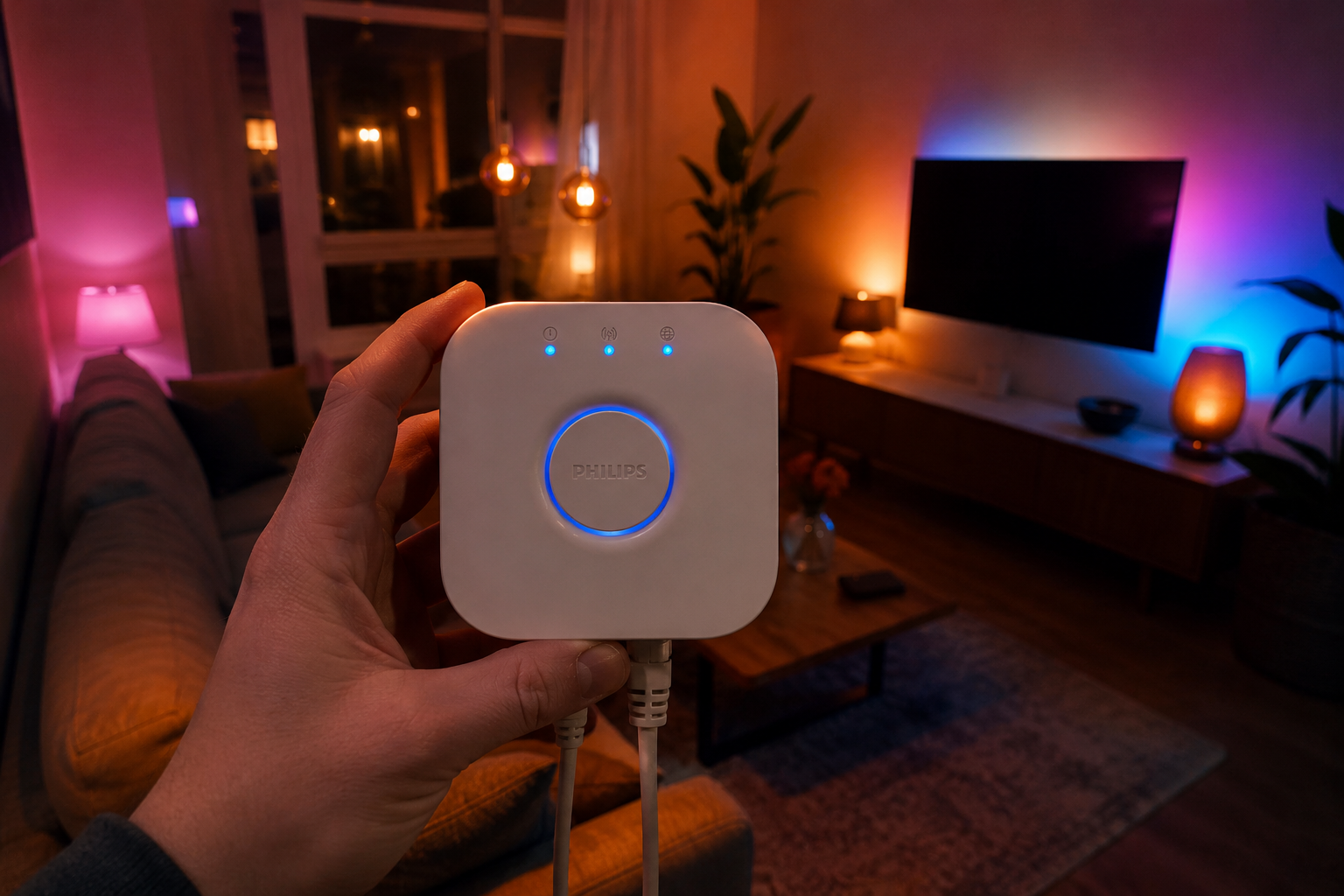
The hue bridge is the brain of your Philips smart lighting system. Here is everything you need to know about setup, features, and whether it is worth it.
Smart lighting sounds simple until you actually start setting it up. You buy a bulb, download an app, and then realize there’s a whole ecosystem sitting behind it that most people don’t think about until they’re already knee-deep in it. The hue bridge is one of those things. It’s a small white device that looks completely unremarkable sitting on a shelf, but it’s essentially the brain that makes the entire Philips Hue system tick. Without it, you’re limited. With it, your smart lighting setup suddenly has a lot more room to grow. This article walks through what the hue bridge actually does, who needs one, how to set it up, and whether it’s genuinely worth the extra cost.
What the Hue Bridge Does
The hue bridge is a small hub device that connects your Philips Hue smart bulbs to your home network. It communicates with your bulbs using Zigbee, a low-power wireless protocol designed specifically for smart home devices. Your phone talks to the bridge over Wi-Fi, and the bridge relays those commands to the bulbs. That two-step communication is what makes the whole system reliable and fast.
You can read a detailed breakdown of Philips Hue Bridge features to get a more technical picture of what the hardware includes. The short version is that the bridge acts as a translator between your home network and the Zigbee mesh your bulbs create among themselves. It supports up to 50 bulbs and 12 accessories per bridge, which is more than enough for most homes.
Zigbee Protocol and Why It Matters
Most people setting up smart lights for the first time have never heard of Zigbee, and honestly, you don’t need to become an expert in it. What you do need to know is that Zigbee operates on a different frequency than Wi-Fi, which means your bulbs don’t clog up your home network with constant traffic. Each bulb also acts as a repeater for other bulbs, so the more you add, the stronger and more reliable the mesh becomes.
This is a significant advantage over Bluetooth-only smart bulbs, which have strict range limits and no mesh capability. Bluetooth bulbs work fine in a single room but fall apart when you’re trying to control lights across a multi-story home. Zigbee through the hue bridge solves that problem cleanly and without extra hardware beyond the bridge itself.
The hue bridge uses the Zigbee Light Link standard, which also means it can technically work with third-party Zigbee bulbs, though Philips doesn’t officially advertise or support that. Some users have had success pairing compatible bulbs from other brands, but your mileage will vary. For the cleanest experience, sticking with Philips Hue branded bulbs is still the right call.
Hue Bridge vs. Bluetooth Mode
Philips Hue bulbs sold today support Bluetooth directly, which means you can control them without a hue bridge at all. The Hue app lets you connect to bulbs via Bluetooth and control them from your phone. For someone who just wants a couple of smart bulbs in a bedroom without any complexity, that’s a decent option and it works fine for casual use.
But Bluetooth mode has real limits that show up fast. You can only control up to 10 bulbs, and you have to be within Bluetooth range of each bulb, which usually means being in the same room or very close to it. You lose remote access entirely — if you leave home and forget to turn off your lights, you simply can’t do it from your phone without the bridge.
The hue bridge removes all of those restrictions in one shot. Remote access works from anywhere in the world as long as your home internet is on. You get full automation support, better integration with third-party platforms, and the ability to scale your setup well beyond 10 bulbs. For anyone serious about smart lighting, the bridge isn’t really optional — it’s essential.
Setting Up Your Hue Bridge
Setting up the hue bridge is one of the less stressful smart home experiences out there. You plug it into your router using the included Ethernet cable, connect the power adapter, and wait for the lights on the front to turn solid. Then you open the Hue app, tap Set up, and follow the on-screen steps. The whole process takes under five minutes if your router is nearby.
One thing to keep in mind: the bridge needs a wired Ethernet connection. It does not connect to Wi-Fi directly. This catches some people off guard, especially if their router is in a different room from where they planned to place the bridge. In most homes, you will want the bridge close to your router, which might mean running a longer Ethernet cable or using a small network switch.
After the initial setup, adding bulbs is refreshingly simple. You screw in a Hue bulb, make sure it is powered on, and tap Add light in the app. The bridge finds it automatically in most cases. If it does not, there is a manual option where you type in the serial number printed on the bulb. Once bulbs are added, you can group them into rooms, set scenes, and start building automations right away.
Remote Access and Voice Control
One of the biggest upgrades the hue bridge brings is remote access. With your bridge connected and a Philips Hue account set up, you can control every light in your home from anywhere in the world using the Hue app. Left for work and can’t remember if you turned off the kitchen light? Two taps and it is done. Heading home early and want the lights on before you arrive? Set it from your car without thinking twice.
Voice control also works seamlessly with the hue bridge in place. Philips Hue integrates with Amazon Alexa, Google Home, and Apple HomeKit without much friction. According to Philips Hue’s official support, the bridge acts as the required HomeKit hub for Apple users, meaning you get full Siri and Home app support without needing an Apple TV or HomePod as an intermediary device.
Setting up voice control is handled through the respective apps. For Alexa, you enable the Philips Hue skill in the Alexa app and link your Hue account. For Google Home, you add the Philips Hue service inside the Google Home app. For Apple HomeKit, you scan the HomeKit code printed on the bottom of the bridge during the initial setup. All three platforms give you room-level and individual bulb control through simple voice commands.
Hue Bridge Automation Features
Automations are where the hue bridge really pulls ahead of Bluetooth-only setups and makes the investment feel completely justified. The Hue app lets you build routines based on time of day, sunrise and sunset timing, motion sensor triggers, and even your physical location. Wake-up routines that gradually brighten your lights starting 30 minutes before your alarm are popular. So are bedtime routines that slowly dim lights and shift them warmer as the evening winds down.
Geofencing is another automation most people underestimate until they actually experience it daily. You set a perimeter around your home in the Hue app, and when you leave that area, your lights can turn off automatically. When you return, they switch back on. It sounds small but it genuinely changes how you interact with your home lighting on a daily basis without any manual effort.
For more advanced users, the Hue app also supports if-then logic through integrations with platforms like IFTTT and Home Assistant. You can build routines that respond to weather, calendar events, or almost anything else with a bit of setup. The hue bridge is the foundation that makes all of this possible because it keeps your system connected and active even when your phone is nowhere near the house.
Connecting Third-Party Platforms
The hue bridge plays well with the broader smart home ecosystem, which is one of its strongest selling points. Home Assistant, the most popular self-hosted smart home platform, has native Philips Hue integration that discovers the bridge automatically on your local network. Once connected, every bulb, switch, and sensor shows up as an entity you can control through Home Assistant dashboards and complex automations.
SmartThings from Samsung also supports the hue bridge natively. You add Philips Hue as a linked service in the SmartThings app and it pulls in all your lights and rooms automatically. This opens up cross-device automations where your Hue lights respond to events from other SmartThings-connected devices like door sensors, presence tags, or Samsung appliances in the same ecosystem.
Apple HomeKit users get arguably the cleanest integration. Because the hue bridge is a certified HomeKit accessory, every bulb and room appears in the iOS Home app without any workarounds. You can use the Home app alongside the Hue app simultaneously, and both stay in sync. This dual-app flexibility is something a lot of competing smart lighting systems don’t offer at the same level of polish.
How Many Bridges Do You Need
One hue bridge supports up to 50 Hue lights and 12 Hue accessories. For most apartments and average-sized homes, one bridge is more than enough. Even a fairly well-lit three-bedroom home with lights in every room, the hallway, outdoor fixtures, and a few lamps probably tops out around 20 to 30 bulbs total.
Larger homes or commercial spaces sometimes need a second bridge. Philips Hue supports multiple bridges under a single account, and the Hue app switches between them automatically based on which zone you are controlling. Each bridge operates as its own independent Zigbee mesh, so there is no cross-bridge communication between bulbs — they just appear in the same app interface side by side.
If you are at 40 or more bulbs and planning to keep growing your setup, buying a second hue bridge before you hit the 50-bulb limit is a smart move. Running a bridge close to its maximum capacity can occasionally cause slower response times or pairing issues. Splitting your setup across two bridges keeps everything running at its best.
Hue Bridge Security Features
Security in smart home devices is a legitimate concern and the hue bridge takes it reasonably seriously. All communication between the Hue app and the bridge is encrypted using industry-standard TLS encryption. Local control — meaning commands sent from your phone while you are on the same home network — doesn’t even leave your house, which reduces exposure significantly compared to systems that route everything through a cloud server.
Philips Hue regularly releases firmware updates for the bridge, and these are pushed automatically when your bridge is online. You can check your current firmware version in the Hue app under Settings and Bridge settings. Keeping firmware current is important because patches often include security fixes alongside performance improvements.
One practical security tip: change your router password and make sure your home Wi-Fi network uses WPA2 or WPA3 encryption. The hue bridge itself is secure, but a weak router is the more common entry point for home network attacks. Your smart lighting is only as secure as the network it sits on.
Common Hue Bridge Problems
Even reliable hardware has its frustrating moments. The most common hue bridge complaint is the offline error in the Hue app, where the app says the bridge is unreachable. This usually happens when your router assigns the bridge a new IP address after a restart. The fix is either rebooting the bridge and router together, or assigning the bridge a static IP address in your router settings so it never changes.
Slow response times are another occasional issue, especially in larger setups. If your bridge feels sluggish, try rebooting it by unplugging the power for 10 seconds. Also check whether any nearby devices are interfering with the Zigbee frequency. Baby monitors, older cordless phones, and some Wi-Fi routers operating on the 2.4 GHz band can occasionally cause interference.
Bulbs dropping off the network is a less common but real issue. This usually happens with bulbs at the edge of your Zigbee mesh that are too far from other bulbs acting as repeaters. Adding a bulb or Hue smart plug between the bridge and the distant bulb strengthens the mesh and usually resolves the dropouts permanently.
Hue Bridge for Renters
Smart lighting is genuinely one of the best upgrades for renters because it requires zero permanent changes to your home. You swap existing bulbs for Hue bulbs, set up the bridge, and when you move out you take everything with you. No drilling, no rewiring, no landlord conversations needed. The hue bridge makes that setup fully functional and feature-complete without touching a single wall.
The only consideration for renters is the Ethernet requirement for the bridge. If your router is in an inconvenient location, you might need a long Ethernet cable running across a room temporarily. Powerline adapters, which use your home’s electrical wiring to extend your network, can help bridge that gap without visible cables running along the floor.
For furnished apartments or short-term rentals where changing bulbs isn’t practical, Hue smart plugs connected through the bridge offer an alternative. Plug-in lamps and floor lamps can be controlled through a smart plug on the bridge without touching the actual bulb at all.
Energy Monitoring With the Bridge
Newer versions of the Philips Hue app include energy monitoring features that work through the hue bridge. You can see how much energy your Hue lights are consuming in real time and track usage over days, weeks, and months. Given that Hue bulbs are LED, the numbers are generally quite low — a standard Hue White bulb uses around 9 watts at full brightness compared to 60 watts for an equivalent incandescent.
The energy monitoring feature is useful for identifying bulbs that are being left on longer than necessary. If your app shows unusually high usage from a particular room, it’s a quick reminder to check your automations or set a timer to handle that room better. Small adjustments based on this data can add up to noticeable savings on your electricity bill over time.
The bridge itself uses very little power — around 2 watts continuously. Running it 24 hours a day adds up to roughly 17.5 kilowatt-hours per year, which costs under three dollars annually in most regions. That is a negligible ongoing cost for the functionality it provides across your entire lighting setup.
Hue Bridge and Smart Sensors
The hue bridge doesn’t just connect bulbs — it also connects Philips Hue sensors, which dramatically expand what your lighting can do automatically. The Hue Motion Sensor detects movement and can trigger lights to turn on when someone enters a room, then turn off after a set period of inactivity. The Hue Outdoor Motion Sensor does the same thing for exterior lighting.
The Hue Tap Switch and Dimmer Switch are physical buttons that connect to the bridge and let you control groups of lights without using your phone or voice. These are particularly useful in households where not everyone wants to use the app or voice commands — kids, older family members, and guests can all use a familiar light switch experience while still benefiting from the smart system behind it.
Combining motion sensors with automations through the hue bridge creates genuinely intelligent lighting. Hallway lights that turn on only when someone is walking through, bathroom lights that dim to 10% at night to avoid waking you fully, outdoor lights that activate at sunset and turn off at a set time — all of this runs automatically through the bridge without any manual input once it is configured.
Hue Bridge Software Updates
Philips Hue updates the bridge firmware regularly, and these updates have meaningfully improved the system over time. Early versions of the bridge had slower response times and fewer automation options. Current firmware versions support instant local control, richer automation logic, and better integration with Matter, the new universal smart home standard.
Matter support is worth calling out specifically. Philips Hue added Matter compatibility to the bridge through a firmware update, meaning your Hue lights can now be controlled natively through any Matter-compatible platform without needing to use the Hue-specific integration. This makes the hue bridge more future-proof than it was even two years ago and reduces the risk of being locked into a single ecosystem long-term.
Updates are applied automatically overnight when your bridge is online and idle. You do not need to manually trigger them in most cases, though you can check for and apply available updates manually through the Settings menu in the Hue app if you prefer not to wait.
Frequently Asked Questions
Q: Do I absolutely need a hue bridge to use Philips Hue bulbs?
No, you can use Hue bulbs in Bluetooth mode without the bridge. The Hue app supports direct Bluetooth control for up to 10 bulbs. However, you lose remote access, most automations, voice control integration, and the ability to use sensors or accessories. For a basic single-room setup, Bluetooth works. For anything more serious, the hue bridge is essential.
Q: Can the hue bridge work without internet?
Yes. The hue bridge operates on your local network, so basic control through the Hue app works even when your internet connection is down. You just need to be connected to the same home Wi-Fi network as the bridge. Remote access, voice assistants, and cloud-based features won’t work without internet, but local control is always available.
Q: How many devices can connect to one hue bridge at the same time?
The hue bridge supports up to 50 Hue lights and 12 accessories like sensors and switches. Multiple phones and tablets can all control the same bridge simultaneously without issues. There is no limit on the number of app users connected at once, which makes it practical for households where multiple people want independent control.
Q: What happens to my hue bridge setup if Philips shuts down its cloud service?
Because the hue bridge uses local control by default, your lights would still be controllable from your home network even if Philips shut down its cloud service. Remote access and voice integrations would be affected, but Matter support now gives Hue setups an additional layer of platform independence that makes the long-term outlook more reliable than it used to be.
Conclusion
The hue bridge is one of those purchases that quietly earns its place in your home over time. When you first buy it, the $59 price tag might feel like an unnecessary add-on to bulbs that can work without it. A few weeks in, after your lights are turning on as you pull into the driveway, dimming automatically as you wind down for the evening, and shutting off completely when the last person leaves the house, that perspective shifts completely.
What the hue bridge gives you is a smart lighting system that actually behaves intelligently instead of just responding to manual commands. The automations, remote access, sensor integrations, and third-party platform compatibility combine into something that feels genuinely well-designed rather than just technically functional. Philips Hue has been refining this ecosystem for over a decade, and the bridge is the piece that holds it all together.
If you are on the fence about whether the hue bridge is worth adding to your setup, the honest answer is yes — assuming you plan to use more than a handful of bulbs or want your lights to do anything beyond simple on and off. The bridge is what separates a basic smart bulb setup from a smart lighting system that actually makes your daily life a little easier and a lot more comfortable.